Deploy Web Apps on Linux
Eight deploy failures we hit on plain Linux servers, why each one happened, and the small setting that fixed it.
TL;DR
Every deploy failure we hit on plain Linux servers came from a default nobody wrote down. Eight of them, and the fix for each:
- Migrations count against the start timeout. Give any service that runs migrations before starting its own, longer start time (we use 15 minutes, not the 90-second default).
- A killed scheduled task can lock itself for a day. Clear the leftover lock when a run fails, and move long work to a queue.
- Some scheduled jobs have no time limit, and missed runs never catch up. Set a limit on every one, and write down what a skipped run means.
- A restart is a short outage. Run two copies of the app and switch between them, so nobody hits a gap.
- A service that never says "ready" gets killed on a loop. Only use that start type when the program supports it.
- A crashed deploy can leave a "still running" flag behind. New deploys should clear old unfinished ones, and every check should ask the same question the same way.
- One shell
exitcan skip your cleanup. Run deploy steps in a subshell so cleanup always happens. - On a shared server, delete by exact name. Removing one app once removed every site on the box.
Bonus: queue workers wait for their current job before stopping, and old cron jobs outlive migrations. Audit both.
Short on time? The summary above is the whole story. Want the details, the examples and the fixes? Read on.
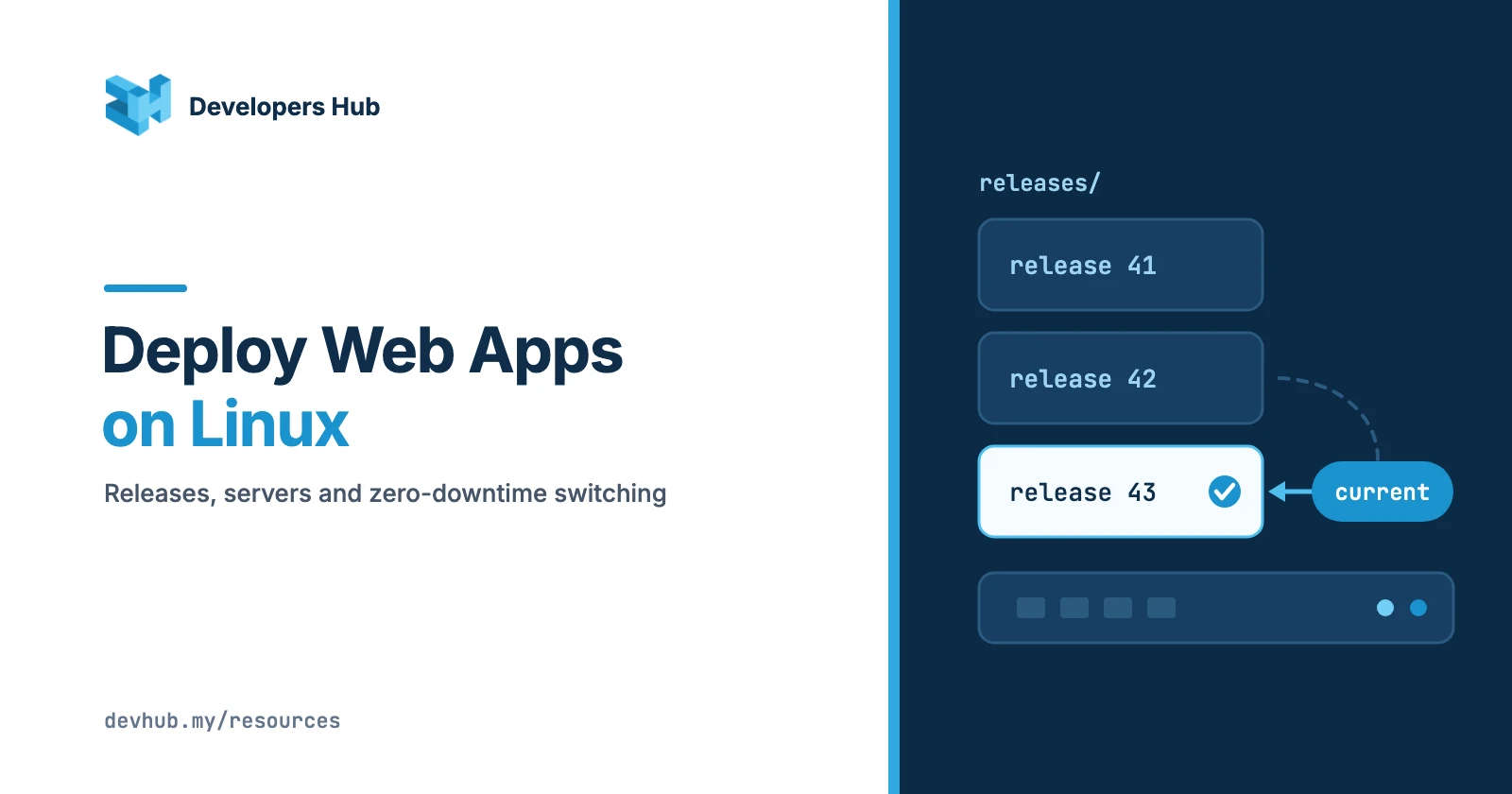
We deploy PHP applications to plain Linux VMs. No Kubernetes, no container scheduler. Each release lands in its own directory, a current symlink points at the live one, and systemd runs everything else: PHP-FPM pools, queue workers, the scheduler, and the migrations that run before a new release starts.
The symlink swap is atomic. Everything around it is not. Once systemd starts, stops, restarts and times out your processes, systemd is your deploy tool, and it ships with defaults. Most of them are sensible for a long-running daemon. Several of them are wrong for a deploy.
Every failure below came from a default we had never written down. For each one we describe what we saw, why it happened, the fix, and the one line we now keep in mind. The examples use an invented app called shop living under /srv/shop.
1. The start timeout includes your migrations
What we saw
The first deploy of a new app, against an empty remote database, failed halfway through migrations. The journal said:
[email protected]: start-pre operation timed out. Terminating.
The retry failed differently: Duplicate column name.
Why
We ran php artisan migrate --force in ExecStartPre=. TimeoutStartSec= covers the whole start phase, which includes every ExecStartPre= line. The default is 90 seconds.
Each migration took between 0.1 and 0.8 seconds over a TLS connection to the database. That is fast per migration. A full history of a few hundred migrations on a fresh database still adds up to more than 90 seconds. systemd sent SIGTERM in the middle of one.
MySQL has no transactional DDL. An ALTER TABLE that already ran stays applied even if the migration that issued it never finished and never recorded itself in the migrations table. On the next run, Laravel tried the same migration again and hit the column it had already added.
Fix
Give any unit that does real work in ExecStartPre= an explicit start budget:
[Service]
ExecStartPre=/usr/bin/php /srv/shop/releases/%i/artisan migrate --force
TimeoutStartSec=900
Use TimeoutStartSec=, never TimeoutSec=. TimeoutSec= sets the start and the stop timeout together. A 15-minute stop timeout means a stuck process holds every restart of that unit for 15 minutes.
Takeaway: if a unit has an
ExecStartPre=, it needs its ownTimeoutStartSec=.
2. A killed scheduler run can lock a command for a day
What we saw
One scheduled command stopped running. No error, no failed job. It came back by itself the next day.
Why
We ran Laravel's scheduler from a timer that fired a Type=oneshot service every minute:
[Service]
Type=oneshot
ExecStart=/usr/bin/php /srv/shop/current/artisan schedule:run
TimeoutStartSec=55
schedule:run runs every due command in series, in the foreground. One of them took longer than usual, the 55-second budget expired, and systemd killed the whole run.
That command used withoutOverlapping(). Laravel implements it with a cache lock that expires after 24 hours by default. The process that held the lock was killed before it could release it. Every following minute, the scheduler saw the lock, assumed a previous run was still going, and skipped the command. For a full day.
We tried runInBackground(). It does not help here. When the main process of a oneshot exits, systemd considers the unit finished and kills what is left in its cgroup, including the background child.
Fix
Three changes:
[Service]
Type=oneshot
ExecStart=/usr/bin/php /srv/shop/current/artisan schedule:run
TimeoutStartSec=900
ExecStopPost=/bin/sh -c '[ "$SERVICE_RESULT" = "success" ] || /usr/bin/php /srv/shop/current/artisan schedule:clear-cache'
- A longer budget, so a slow run finishes instead of dying.
ExecStopPost=clears the scheduler's mutexes whenever the run did not end insuccess. systemd sets$SERVICE_RESULTfor stop commands, so a timeout or a signal triggers the cleanup and a clean run does not.- Long work moves to the queue. The scheduled command dispatches a job and returns in milliseconds.
Schedule::job(new RebuildSearchIndex)->hourly();
Takeaway: a lock with a 24-hour expiry plus a process that can be killed equals a command that silently skips a day.
3. A oneshot has no runtime limit, and a timer does not queue
What we saw
A nightly job hung on a network call. It was still "activating" three days later, and no nightly run had happened since.
Why
Three defaults stacked up:
- For
Type=oneshot,TimeoutStartSec=defaults to infinity. The 90-second default from lesson 1 does not apply. RuntimeMaxSec=has no effect on a oneshot. A oneshot spends its whole life in the start phase, andRuntimeMaxSec=only counts time after start completes.- When a timer fires while its service is still running, systemd does not queue a second run. The start request merges into the job already in progress. Missed ticks are gone.
Persistent=trueonly catches up on runs missed while the machine was off.
So a hung oneshot blocks its own schedule forever, and nothing catches up when it finally dies.
Fix
Set the budget explicitly on every timer-driven oneshot:
[Service]
Type=oneshot
ExecStart=/usr/bin/php /srv/shop/current/artisan reports:nightly
TimeoutStartSec=1800
Then write down, next to the timer, what happens on a skip. If the job must cover every period, make it work out what it missed from data, such as "all orders since the last successful export", instead of trusting that it ran yesterday.
Takeaway: a oneshot without
TimeoutStartSec=can run forever, and a timer skips ticks; it never queues them.
4. systemctl restart is a short outage
What we saw
A burst of 502s from nginx on every deploy. Small, but every time.
Why
systemctl restart is stop, then start. Between the two, the FPM socket is gone and nginx has nowhere to send requests. Moving the current symlink does not change that, because the running pool already resolved its paths. A restart is how you make it see the new release, and the restart is the gap.
Fix
Run two copies of the pool as a template unit and switch between them:
# /etc/systemd/system/[email protected]
[Service]
Type=simple
WorkingDirectory=/srv/shop/colours/%i
ExecStart=/usr/sbin/php-fpm8.4 --nodaemonize --fpm-config /etc/shop/fpm-%i.conf
TimeoutStartSec=60
/srv/shop/colours/blue and /srv/shop/colours/green are symlinks to specific releases, and each colour listens on its own socket, /run/shop/fpm-blue.sock or /run/shop/fpm-green.sock. A deploy then goes:
ln -sfn /srv/shop/releases/20261104-1015 /srv/shop/colours/green
systemctl start shop-fpm@green
# health check straight against the new pool, before nginx sends it traffic
SCRIPT_FILENAME=/srv/shop/colours/green/public/index.php REQUEST_URI=/up REQUEST_METHOD=GET \
  cgi-fcgi -bind -connect /run/shop/fpm-green.sock | grep -q 'Application up' || exit 1
sed -i 's/fpm-blue.sock/fpm-green.sock/' /etc/nginx/conf.d/shop-upstream.conf
nginx -t && systemctl reload nginx
systemctl stop shop-fpm@blue
nginx reload keeps old connections on the old workers until they finish, so no request sees a closed socket.
Only after the new colour has passed its health check do we "promote": move current, and restart the queue workers and the scheduler, which read from current. If the health check fails, nothing that matters has moved.
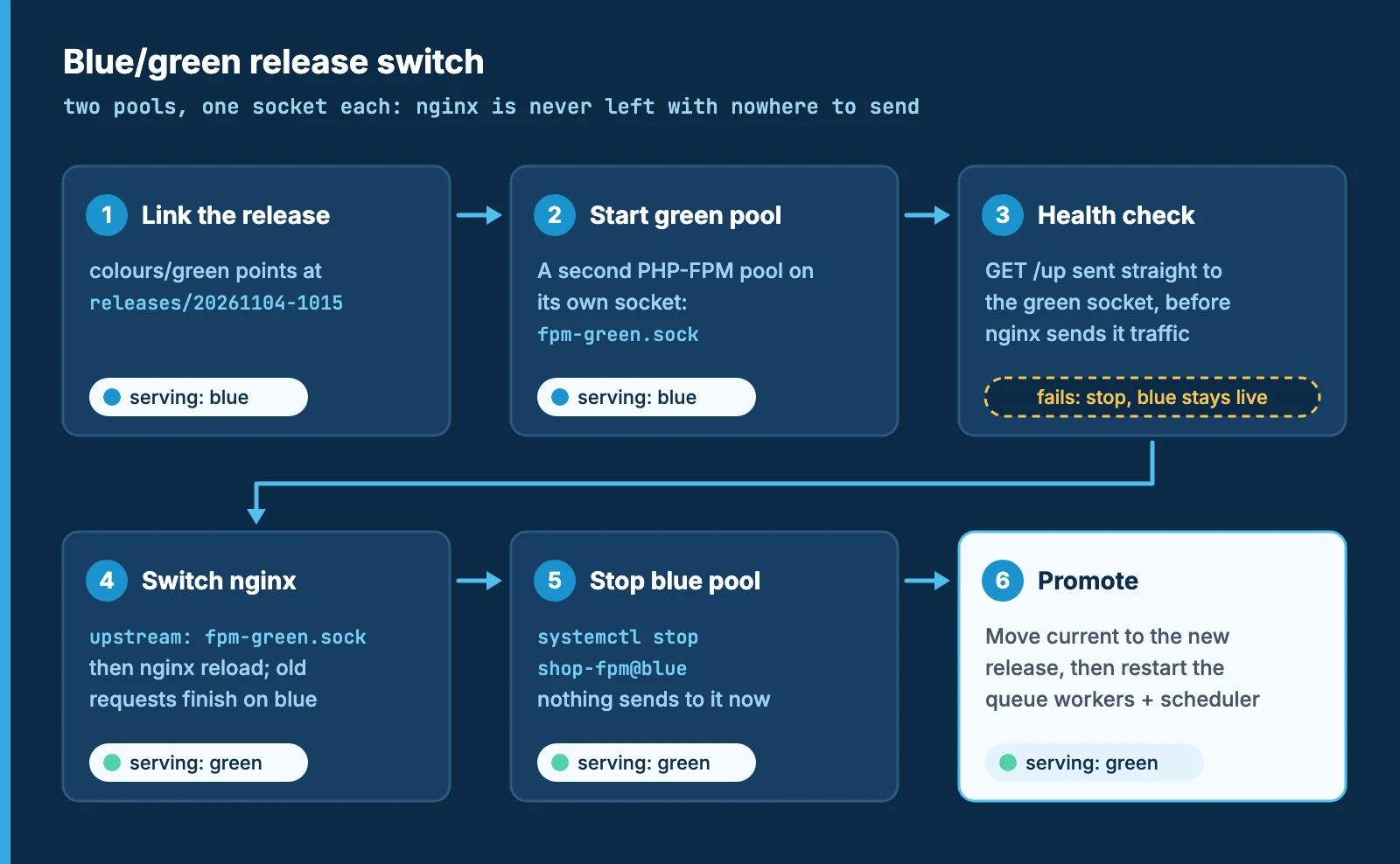
Takeaway: the symlink swap is atomic on disk only; the process swap needs two processes.
5. Type=notify on a daemon that never notifies
What we saw
An object storage daemon was restarted 861 times in about 22 hours. It was down for roughly 5 seconds out of every 95. Our health checks were green the whole time, because they happened to land in the 90 seconds when it was up.
Why
The unit said Type=notify. With that type, systemd waits for the process to send READY=1 over the notify socket before it considers the start complete. This daemon did not implement sd_notify. It started, served requests normally, and never said it was ready. After 90 seconds, the start timeout fired, systemd killed it, and Restart=always started it again.
Fix
Use Type=simple and do your own readiness check from the deploy script:
[Service]
Type=simple
ExecStart=/usr/local/bin/objstore server /srv/objstore
Restart=always
systemctl start objstore
for i in $(seq 1 30); do
  curl -fsS http://127.0.0.1:9000/health && break
  sleep 1
done
Before you write Type=notify, check that the program supports it. ldd $(command -v objstore) | grep libsystemd is a quick hint, and the documentation should mention sd_notify or NOTIFY_SOCKET. Statically linked Go binaries will not show up in ldd, so read the docs for those.
Takeaway:
Type=notifyis a promise the binary has to keep; if it does not, systemd kills it on a schedule.
6. An orphaned "in progress" release blocks deploys and lets others through
What we saw
The deploy button refused to start: "a deploy is already running". Nothing was running. Meanwhile, deploys triggered from a git webhook went through fine. Ten releases went live past the stuck one.
Why
This one is ours, but systemd caused it. The worker running a release was killed with SIGKILL when its unit hit TimeoutStopSec=. SIGKILL cannot be caught, so the code that marks the release as finished never ran. The release row stayed in_progress.
Every guard that asked "is a deploy already running?" found that row and refused, forever. The webhook path had no guard at all, so it kept deploying. We had two answers to one question in the codebase.
Fix
Two rules.
First, starting a new release settles any older unsettled release for the same app. We mark it abandoned, not failed, so reports do not count it as a code failure:
Release::where('app_id', $app->id)
    ->whereIn('status', ['queued', 'in_progress'])
    ->where('id', '<', $release->id)
    ->update(['status' => 'abandoned', 'finished_at' => now()]);
Second, one shared query decides what "in flight" means, and every path uses it. That query ignores rows older than the job timeout, because no worker can still own them:
public function scopeInFlight(Builder $query): Builder
{
    return $query->whereIn('status', ['queued', 'in_progress'])
        ->where('started_at', '>', now()->subSeconds(config('deploy.job_timeout')));
}
Takeaway: any state a process sets on start, a SIGKILL can leave behind; design for the row that never gets its ending.
7. exit in a brace group skips your cleanup
What we saw
Some deploys hung until someone cancelled them. The remote command had already failed. The SSH session stayed open.
Why
Our remote deploy script printed a heartbeat line every 10 seconds, so long steps like composer install would not trip the SSH inactivity timeout. It looked like this:
( while true; do echo "still working"; sleep 10; done ) &
HEARTBEAT=$!

{ set -e; run_deploy_steps; }

kill "$HEARTBEAT"
A { ...; } brace group runs in the current shell. When a step failed and called exit (or set -e triggered one), the whole script exited at that point. kill "$HEARTBEAT" never ran. The heartbeat loop kept printing, which kept the connection alive, which meant the inactivity timeout that should have ended the session never fired.
Fix
Run the steps in a ( ... ) subshell. exit then leaves the subshell only, and the parent always reaches the cleanup:
( while true; do echo "still working"; sleep 10; done ) &
HEARTBEAT=$!

( set -e; run_deploy_steps )
STATUS=$?

kill "$HEARTBEAT" 2>/dev/null
exit "$STATUS"
A trap 'kill "$HEARTBEAT"' EXIT is a reasonable second layer.
Takeaway: anything you start in the background needs a cleanup path that an
exitcannot skip.
8. Tearing down one app removed every site on the server
What we saw
We removed one app from a shared server. Every other site on that server lost its nginx vhost and its TLS certificate.
Why
nginx and the certificate store are machine-wide. The teardown code was first written for a server that hosted one app, so "remove the web server config" meant the whole directory. On a shared server, that is everyone's config.
Fix
Teardown removes only what it can name as its own. Every file we create carries the app name, so the teardown can list it exactly:
rm -f /etc/nginx/sites-enabled/shop.conf /etc/nginx/sites-available/shop.conf
rm -f /etc/nginx/conf.d/shop-upstream.conf
certbot delete --cert-name shop.example.com --non-interactive
nginx -t && systemctl reload nginx
Machine-wide cleanup, such as removing nginx itself or shared snippets, runs only when the server has no other apps left on it.
Takeaway: on a shared host, delete by exact name, never by directory.
Two smaller ones
Queue workers wait for their job before they stop. A worker restart waits up to
TimeoutStopSec=for the current job to finish. We had set 300 seconds for workers, so every deploy stalled all queues for up to five minutes. SetTimeoutStopSec=just above the worker's--timeout, keep jobs short, and split long jobs into chunks that can stop between steps.
Old cron jobs outlive migrations. After moving the scheduler to systemd timers, we found a legacy crontab entry on one server still running
schedule:runfrom an old release path against the production database. Runcrontab -lfor every user and check/etc/cron.dwhenever you change how scheduling works.
Checklist
Before shipping a unit file or a deploy script, we now check these:
- Every unit with
ExecStartPre=setsTimeoutStartSec=sized for a full migration history. - No unit uses
TimeoutSec=; start and stop timeouts are set separately. - Every timer-driven
Type=oneshotsets an explicitTimeoutStartSec=. - The scheduler unit clears schedule mutexes in
ExecStopPost=when$SERVICE_RESULTis notsuccess. - Long scheduled work is dispatched to the queue, not run inside
schedule:run. - Each timer has a note on what a skipped tick means for that job.
- Web processes deploy blue/green;
current, workers and scheduler move only at promote. Type=notifyis used only for binaries confirmed to sendREADY=1.- "Deploy in flight" is one shared query, with a staleness cut-off, used by every entry point.
- Starting a release settles older unsettled releases as
abandoned. - Background helpers in deploy scripts are cleaned up outside any block that can
exit. - Teardown on shared servers deletes files by exact name.
- Worker
TimeoutStopSec=sits just above the job timeout. - Crontabs are audited when scheduling moves.
None of these needed new tooling. Each one needed a default to be written down in the unit file, where the next person can see it.