CLAUDE.md: A Practical Framework for Claude Code Projects
A practical guide to using CLAUDE.md as the core context for Claude Code projects. Learn how rules, skills and hooks keep project guidance focused and easier to maintain.
Working with Claude on a real software project changes the moment you stop treating it like a chatbot and start treating it like a member of the development team.
It needs context.
Not every piece of context, though.
It needs the right context.
That distinction is the foundation of a good CLAUDE.md.
Claude Code uses CLAUDE.md files to provide persistent instructions and project context across sessions. The file can describe project conventions, commands, workflows, and other information that helps Claude make better decisions while working in the repository.
But there is a common temptation when creating one.
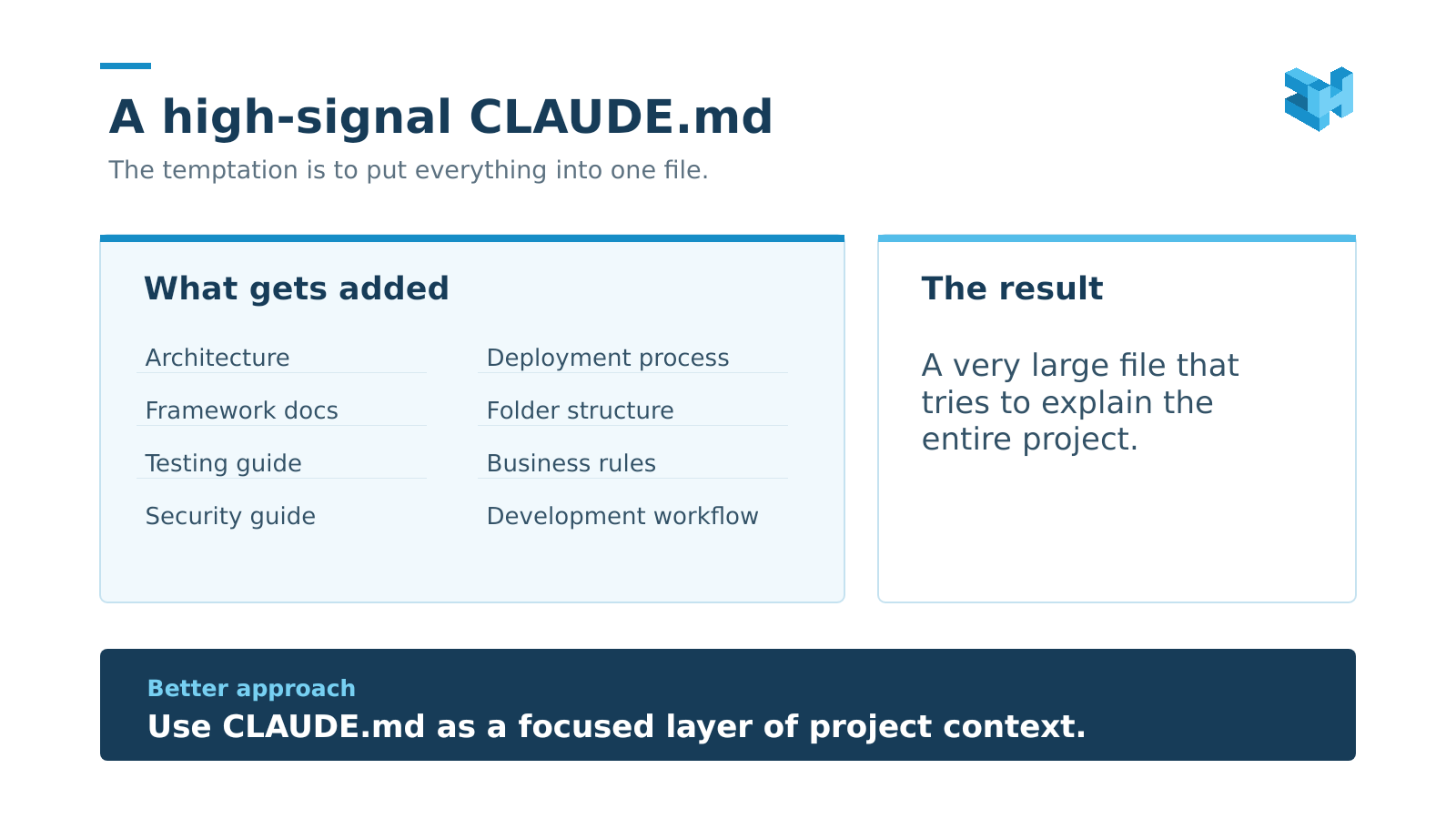
The central principle is simple:
If Claude can reliably discover it from the codebase, do not put it in CLAUDE.md.
The file should focus on things that are important, project-specific, easy to misunderstand, or difficult to infer from the code alone.
This guide presents a practical framework for doing that.
1. What is CLAUDE.md?
CLAUDE.md is a Markdown file used to give Claude persistent instructions and context for a project.
Think of it as the project's working brief for Claude.
It can tell Claude things such as:
- which commands to run
- how the project differs from framework defaults
- which patterns the team follows
- which files or changes require care
- how certain business terms are defined
- what "done" means
- which project-specific mistakes to avoid
Claude Code can load CLAUDE.md from supported scopes, including project-level locations, so the instructions can become part of the working context across sessions.
There is an important distinction, though.
CLAUDE.md is not the project manual.
It does not need to explain every file.
It does not need to repeat framework documentation.
It does not need to contain every process the team has ever written down.
The codebase remains the main source of truth for the code.
CLAUDE.md gives Claude the additional context needed to work well inside that codebase.
2. Why CLAUDE.md matters
Software projects contain a lot of information.
Some of it is obvious from the code.
Some of it is not.
A developer joining a project may quickly discover that a project has a certain folder structure. They may not immediately know why one particular service must always be used instead of calling an API directly.
They can read the code.
They can search.
They can ask the team.
But an AI agent benefits from being given the important project-specific context early.
That is where CLAUDE.md becomes useful.
A good file helps Claude answer questions such as:
How do we test this project?
Which pattern should I follow?
Is this file safe to change?
What does this business term actually mean here?
What does the team consider complete?
The value is not in the number of instructions.
The value is in how much useful decision-making context each instruction provides.
Claude Code's own documentation recommends keeping project instructions focused. It also distinguishes between CLAUDE.md, scoped rules, skills, hooks, and other configuration mechanisms because they solve different problems.
3. The context budget problem
Every time you add another rule, you are adding more information Claude has to consider.
That does not make every rule bad.
It means every rule should earn its place.
Consider two instructions.
Use Laravel.
And:
Business logic in this project is implemented through invokable Action classes. Follow the existing Action pattern.
The first one tells Claude something it already knows.
The second tells Claude something specific about this project.
That is the kind of information worth keeping.
A useful test is:
Can Claude learn this by inspecting a few relevant files?
If the answer is yes, question whether the information belongs in the main context file.
Then ask:
Is this relevant to most tasks?
If not, it may belong in a more specific location.
Then ask:
Would Claude likely make a mistake without it?
If yes, its value goes up.
The goal is not to maximise context.
The goal is to maximise useful context.
4. What belongs in CLAUDE.md
A strong CLAUDE.md usually contains a small number of high-value categories.
For a typical project, these are:
- Commands
- Environment quirks
- Project conventions
- Boundaries
- Domain vocabulary
- Definition of Done
- Gotchas
These categories are broad enough to work across many projects, while still leaving room for the project to define its own rules.
The exact structure can change.
The principle should remain:
Keep durable project knowledge that Claude cannot reliably infer on its own.
5. What does NOT belong
Knowing what to leave out is just as important.
Do not turn CLAUDE.md into a second copy of the repository.
If the project already makes something clear, there may be no reason to repeat it.
You usually do not need:
- framework tutorials
- generic programming advice
- long explanations of common patterns
- a complete security textbook
- every folder in the repository
- every dependency
- every API endpoint
- every historical decision
- temporary debugging notes
For example, telling Claude:
Follow SOLID principles.
is not very useful on its own.
It is broad.
It is difficult to measure.
It does not tell Claude what is different about this project.
A better instruction would describe the actual project convention.
The same applies to security.
You do not need to rewrite an entire OWASP guide inside CLAUDE.md.
Keep the project-specific rules that are easy to get wrong or especially important in your environment.
6. Commands
Commands are simple, but they have very high practical value.
Do not make Claude guess how the project is tested or linted.
Tell it.
A useful section might look like this:
Commands
- Test: [test command]
- Single test: [single test command]
- Lint: [lint command]
- Development: [development command]
- Database setup: [database command]
That is enough.
There is no need to explain what the commands do unless the behaviour is unusual.
The objective is to make the correct action obvious.
Commands are also a good example of the difference between documentation and context.
You are not documenting the tool.
You are telling Claude which command this project uses.
7. Environment quirks
Some of the most useful project knowledge comes from things that are not obvious in the code.
Maybe the project uses a specific PHP version.
Maybe development uses one local environment instead of another.
Maybe the test suite depends on PostgreSQL behaviour.
Maybe a queue worker must be running before a certain feature works.
Maybe a local service must be started separately.
These details can save a lot of confusion.
Keep them short.
Environment
- [Runtime version]
- [Framework version]
- [Local development environment]
- [Database]
- [Required background process]
Do not turn this section into a full installation guide.
Keep only the quirks that affect how Claude should work.
8. Project conventions
This is where the project becomes different from the framework.
A framework has defaults.
Your project has decisions.
Those decisions should be visible.
For example:
Conventions
- Public IDs use UUIDs.
- Internal IDs are not exposed.
- Business logic uses invokable Action classes.
- Side effects use Observers.
- Enums expose project-specific methods.
The actual rules will depend on the project.
The important part is that they describe your implementation choices, not generic software theory.
Another useful technique is the reference file.
Instead of explaining a pattern in several paragraphs, point Claude to one good implementation.
Business logic follows the existing Action pattern.
Reference: [path to example]
One strong example often communicates more clearly than a long description.
9. Boundaries
Every project has things that should be handled carefully.
Some changes are reversible.
Some are not.
Some files are generated.
Some files are shared with other systems.
Some changes require approval.
This deserves a clear section.
Boundaries
- [File or area that must not be edited directly]
- [Change that requires approval]
- [Dependency change that requires approval]
- [Generated file that must not be modified]
- [Database rule]
Good boundaries are specific.
"Be careful with migrations" is weak.
"Do not edit migrations already merged into the main branch. Add a new migration instead." is much stronger.
The second instruction tells Claude what the safe action is.
10. Domain vocabulary
Code does not always explain business language well.
A project may use the word "member" to mean a customer.
Another project may use "member" to mean an employee.
The word looks familiar.
The meaning is not.
This is why domain vocabulary belongs in the context layer when the meaning is important.
For example:
Vocabulary
- "Tenant" means the client organisation.
- "Agent" means an internal support staff member.
- "Member" means a user belonging to the client organisation.
- "Application" means a submitted request, not the software itself.
You do not need a glossary with fifty terms.
Keep the terms that are important enough to affect implementation decisions.
Business language is one of the areas where human knowledge is often much harder to infer from code alone.
11. Definition of Done
A task is not finished simply because the code compiles.
Every project has its own definition of completion.
For example:
Done means
- Formatter passes.
- Test suite passes.
- New behaviour has automated coverage.
- Required checks are complete.
The exact rules are yours to define.
The important thing is that they are measurable.
Compare:
Write clean code.
with:
New behaviour must have a test and the full test suite must pass.
The second one gives Claude something it can verify.
That makes it much more useful.
12. Gotchas
This is where the project starts to capture real experience.
A gotcha is something that looks simple but has an important trap.
Maybe an API behaves differently from what its documentation suggests.
Maybe a database field has special behaviour.
Maybe an old integration depends on an unexpected sequence.
Maybe a framework feature causes a side effect.
These are valuable because the code may not explain the reason clearly.
A useful format is:
Gotcha: [Problem] → [Why it happens] → [Correct approach]
For example:
Gotcha: [Problem]
Why: [Reason]
Correct approach: [Safe implementation]
This is much more useful than:
Be careful here.
The goal is to store the lesson.
13. .claude/rules/
Not every rule needs to live in the main CLAUDE.md.
Claude Code supports .claude/rules/ for additional project rules. Rules can be organised by topic, and path-scoped rules can apply only when Claude works with matching files.
This is useful when a rule is important, but only for a certain part of the project.
For example:
.claude/
├── CLAUDE.md
└── rules/
├── api.md
├── database.md
├── frontend.md
└── testing.md
A database-specific rule does not need to sit in the main project context when Claude is working on something unrelated.
This gives you a cleaner structure.
The main file remains focused.
The specialised rules stay close to the work they govern.
14. Skills
Some instructions are not really rules.
They are procedures.
That difference matters.
A rule might say:
API responses use API Resources.
A procedure might say:
When creating a new API endpoint, create the request class, validate the input, implement the Action, add the Resource, write the feature test, run the test suite, then update the documentation.
That is a workflow.
It is a good candidate for a skill.
Claude Code skills are designed for reusable instructions and multi-step procedures that do not need to be loaded into context all the time. They can be invoked directly or used when Claude determines they are relevant.
This gives you a simple distinction:
CLAUDE.md tells Claude how the project works.
A Skill tells Claude how to perform a particular type of work.
That separation keeps the main context cleaner.
15. Hooks
Hooks solve another problem.
Some things should not depend on Claude remembering to do them.
They should happen automatically.
That is where hooks come in.
Claude Code hooks can run commands at defined lifecycle events. They can be used for formatting, validation, notifications, logging, and other deterministic checks.
The distinction is useful.
A CLAUDE.md instruction says:
Run the formatter after making changes.
A hook can actually run the formatter.
That is stronger.
Use instructions for guidance.
Use hooks when you need repeatable enforcement.
When a rule must hold every time, automation is usually safer than relying on a written instruction alone.
16. Scope hierarchy
A common mistake is thinking there is only one CLAUDE.md.
Claude Code supports different configuration scopes, including user, project, and other supported locations. The wider the scope, the more generally the instruction applies. More specific project context can then add rules for a particular repository or area of work.
A useful mental model is:
Global context
↓
User preferences
↓
Project context
↓
Path-specific rules
↓
Task-specific skills
↓
Automatic enforcement
The exact configuration depends on how your team uses Claude Code.
The important idea is simple:
Put each instruction at the narrowest scope where it is still useful.
A company-wide convention should not be repeated in every repository.
A rule for one API folder should not affect the entire project.
A temporary personal preference should not become a team convention.
Good scope reduces noise.
17. Maintenance
CLAUDE.md should not be treated as a file you write once and forget.
Projects change.
Architecture changes.
Conventions change.
Old gotchas stop mattering.
New ones appear.
The file should change with the project.
A simple maintenance loop is enough:
Use project
↓
Claude makes a mistake
↓
Understand why
↓
Decide where the knowledge belongs
↓
Update the correct layer
↓
Use it again
Do not add a new rule every time something goes wrong.
First ask what kind of knowledge it actually is.
Maybe it belongs in CLAUDE.md.
Maybe it belongs in a scoped rule.
Maybe it belongs in a skill.
Maybe it should be automated with a hook.
Maybe it does not need to be stored at all.
Claude Code also provides tools such as /memory, /skills, /hooks, and /doctor to inspect and diagnose configuration.
The best context setup evolves through real use.
18. A complete CLAUDE.md example
A good starting template can be surprisingly small.
[Project Name]
[One line describing the project and its users.]
Commands
- Test: [command]
- Single test: [command]
- Lint: [command]
- Development: [command]
Environment
- [Runtime]
- [Framework]
- [Database]
- [Important environment quirk]
Conventions
- [Project-specific convention]
- [Naming rule]
- [Business logic pattern]
- [Integration pattern]
Reference: [example file]
Boundaries
- [Do not modify]
- [Ask before doing]
- [Database boundary]
- [Dependency boundary]
Vocabulary
- "[Term]" = [meaning]
- "[Term]" = [meaning]
- "[Term]" = [meaning]
Done means
- [Required check]
- [Required test]
- [Required validation]
Gotchas
- [Problem] → [Why] → [Correct approach]
Notice what is missing.
There is no framework manual.
There is no giant architecture essay.
There is no generic security textbook.
There is no complete development handbook.
The file gives Claude the information that matters most when it is making decisions inside the project.
That is the point.
19. Common mistakes
Most problems with CLAUDE.md come from good intentions.
The team wants Claude to understand everything.
That instinct is understandable.
A few mistakes appear repeatedly.
Making the file too generic
Rules such as "write clean code" or "follow best practices" are too broad to provide much project-specific guidance.
Make the rules concrete.
Repeating information already obvious from the code
If the repository already makes something clear, repeating it adds little value.
Use CLAUDE.md for the things that are not obvious.
Teaching the framework
Your project is not the framework.
Document your decisions, not everything the framework can do.
Putting every workflow into the main file
Long procedures often belong in skills.
Describing security instead of enforcing it
Some safety rules need permissions, hooks, or other controls. A sentence in CLAUDE.md is guidance, not a guarantee.
Keeping historical information forever
Not every decision deserves permanent memory.
Keep durable knowledge.
Remove obsolete knowledge.
Adding rules before they are needed
A better rule is often discovered through real work.
Let the project teach you what deserves to be remembered.
20. The final framework
After all the sections, the framework can be reduced to one simple model.
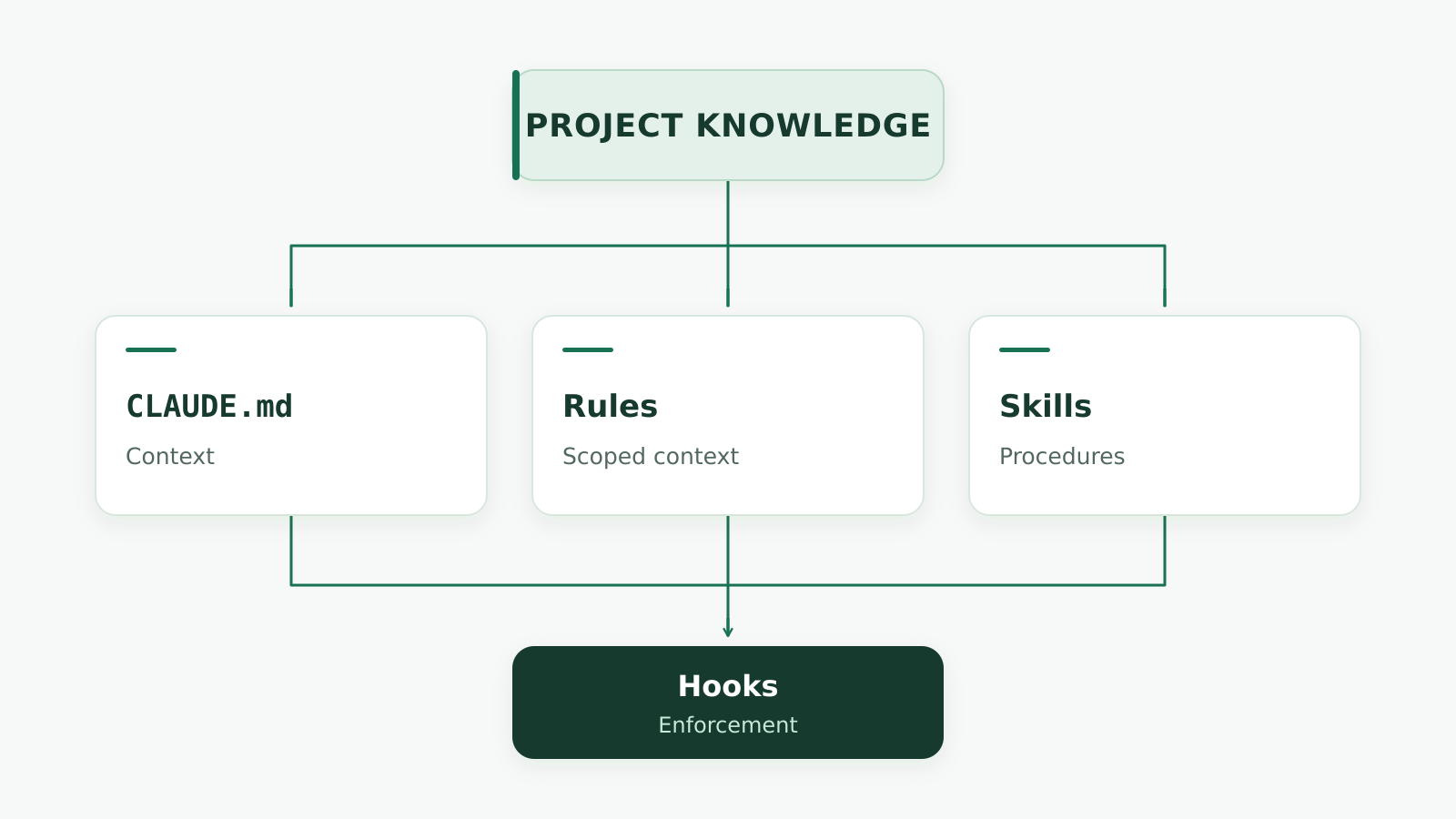
And inside CLAUDE.md:
CLAUDE.md
The framework is built around one idea:
Keep the context that Claude cannot reliably infer. Put everything else in the right place.
That may mean the codebase itself.
It may mean .claude/rules/.
It may mean a Skill.
It may mean a Hook.
It may mean nothing at all.
The goal is not to make Claude know everything.
The goal is to help Claude make better decisions.
The point is not a bigger CLAUDE.md
A good CLAUDE.md is not impressive because it is long.
It is useful because it is clear.
It tells Claude what matters.
It prevents common mistakes.
It captures project decisions.
It gives the agent the right commands.
It defines important boundaries.
It explains the business terms that code cannot explain by itself.
And when something becomes too specific for the main file, it gives that knowledge a better home.
That is the real value of CLAUDE.md.
It turns scattered project knowledge into usable context.
And the best way to build one is not to try to predict everything Claude will ever need.
Start with what matters.
Use the project.
Notice where the agent gets things wrong.
Learn from those mistakes.
Then improve the system.
Over time, CLAUDE.md becomes less like a document and more like a carefully maintained layer between the human team, the codebase, and Claude.
That is where it becomes genuinely useful.
Less noise. Better context. Better decisions.